
Date Management


Found in Repair Center, this report allows you to track/manage your monthly projected sales.
Daily tracking report send out daily. This information is pulled from the Gross Margin report in Repair Center.
Date Management 101

DR or Estimate
Due In and Due Out dates reflect the date of the estimate appointment.
Example:
Customer is booked for an estimate on Feb 3.
Pending an Appointment/New Claim
Due In and Due Out dates reflect the last day of the fiscal year (October 31)
Example:
Estimate is pending approval by MPI so no appointment is set yet.

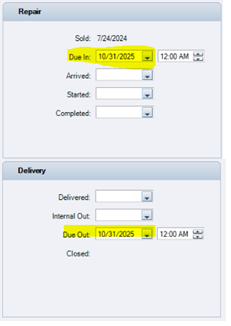
Change the estimate appointment date to reflect the original estimate appointment.

Repair/Drop Off Appointment
Due In Date reflects the date the customer will be dropping off the vehicle for repairs. Due Out date is best guess as to when repairs will be done.
Arrived date to be updated when the vehicle arrives at the shop for repairs.
Started date to be updated when job handed to technician to begin repairs. Commonly done at the same time as Arrived date.
Repairs Completed
Completed and Delivered dates to be updated. Due Out date can be changed to match.
Example:
Vehicle was completed and returned to customer ahead of the estimated Due Out date.


Note: Due Out date indicates which month the sale will be captured in. If a job is not going to be delivered by the end of the month, the due out date must be changed to the next month!
